Steps for Transferring Physical Records to Records Management Warehouse
Step | Action |
|---|---|
1 | Verification of Official Records (ONLY) for storage : Only official records are eligible for inactive storage. No convenience copies are accepted.
|
2 | Ordering Boxes Coordinate with your District and Division purchaser to submit order for boxes item number: (NIGP # 615-37-13-0850).
|
3 | Preparation of Records. Make sure you only packaging official records in the boxes.
|
4 | Packaging of Boxes.
|
5 | Marking of Boxes If more than one box is used, mark them with temporary box numbers (1, 2, 3...). For Districts and Divisions with specific box numbering schema – they can continue to use their own box numbers. (example: ROW/HRD).
(See Chapter 10 “Inactive Records – Transmittal and Storage Documentation” for detailed instructions). |
6 | Transferring of Boxes. Austin headquarters divisions and offices use interoffice mail if there are five or fewer boxes.To schedule larger shipment, prepare a Courier Pick Up/Delivery Form 2539 and email
. If you require additional assistance contact Records Management. If there are enough boxes to ship on a pallet, do the following:
|
7 | Completing 1419 Records Transmittal Form. All boxes are required to be accompanied by a hard copy of the 1419 Records Transmittal Form. (See Section 3 “Transmittal and Storage Documentation” of this chapter for detailed instructions) Ensure all required information for the records is identified on the 1419 Records Transmittal Form. After completing the form:
See example below.
|
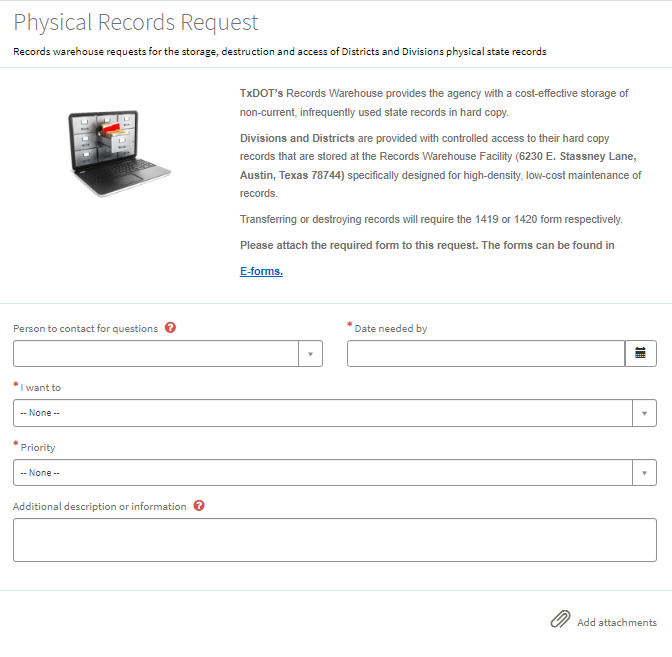
Figure 10-1. Physical Records Request.